
How to Manage Multiple Projects with ADHD
Learn how to manage multiple projects with ADHD: set boundaries, build external systems, delegate and batch your week without burning out.
Jan Kutschera
You’ve got seven live projects, an invoice you meant to send, and a client asking whether the latest file is the latest file. It’s 2 a.m., you’re scrolling your inbox, and somehow you’re both exhausted and considering a new business idea.
The problem isn’t that you need a more ambitious to-do list. You need a way to leave a project and return without conducting an archaeological dig through your own decisions.
Table of Contents
- Why Juggling Projects Breaks Down and What Works Instead
- How to Set Project Boundaries in Six Steps
- Build an External Command Center for Every Project
- Pause and Restart Without Losing the Thread
- Delegate With Role Templates and a Handoff Checklist
- Batch Your Week and Reward Each Finished Block
- Review Your Portfolio Weekly and Book Your Next Step
Why Juggling Projects Breaks Down and What Works Instead
Multi-project work is a structural problem, not a character flaw. In a study of more than 500 managers working in global companies, Harvard Business Review found that 81% of team-based employees worked on more than one project concurrently. Trying to carry those commitments in your head isn’t a management method.
For an ADHD founder, the practical challenge is re-entry: remembering what mattered, what changed, and what you intended to do next. Constant availability doesn’t solve that. It gives everyone permission to interrupt the reconstruction.
Working principle: Leave work in a state your future self can understand without interviewing your past self.
Jan Kutschera has been building ADHD-compatible systems by pure instinct for 30 years. The useful lesson isn’t to become more disciplined at remembering everything. It’s to build external structures that make remembering less necessary.
Learning how to manage multiple projects means creating boundaries, a command center, restart notes, clear delegation, a block schedule, and a review rhythm. For channel-specific complexity, the social account management tips from PostSyncer complement that structure when your projects involve several social accounts. Keep operational detail inside each project, rather than turning your portfolio into an enormous task soup.
How to Set Project Boundaries in Six Steps
A project without boundaries becomes a subscription you forgot you signed up for. There’s always another improvement, stakeholder suggestion, or apparently essential animation.
Before choosing software, define what each commitment is allowed to consume. Scope, time, ownership, and dependencies belong together, not scattered across a proposal, your calendar, and a message someone sent last Tuesday.
Define the commitment before scheduling it
-
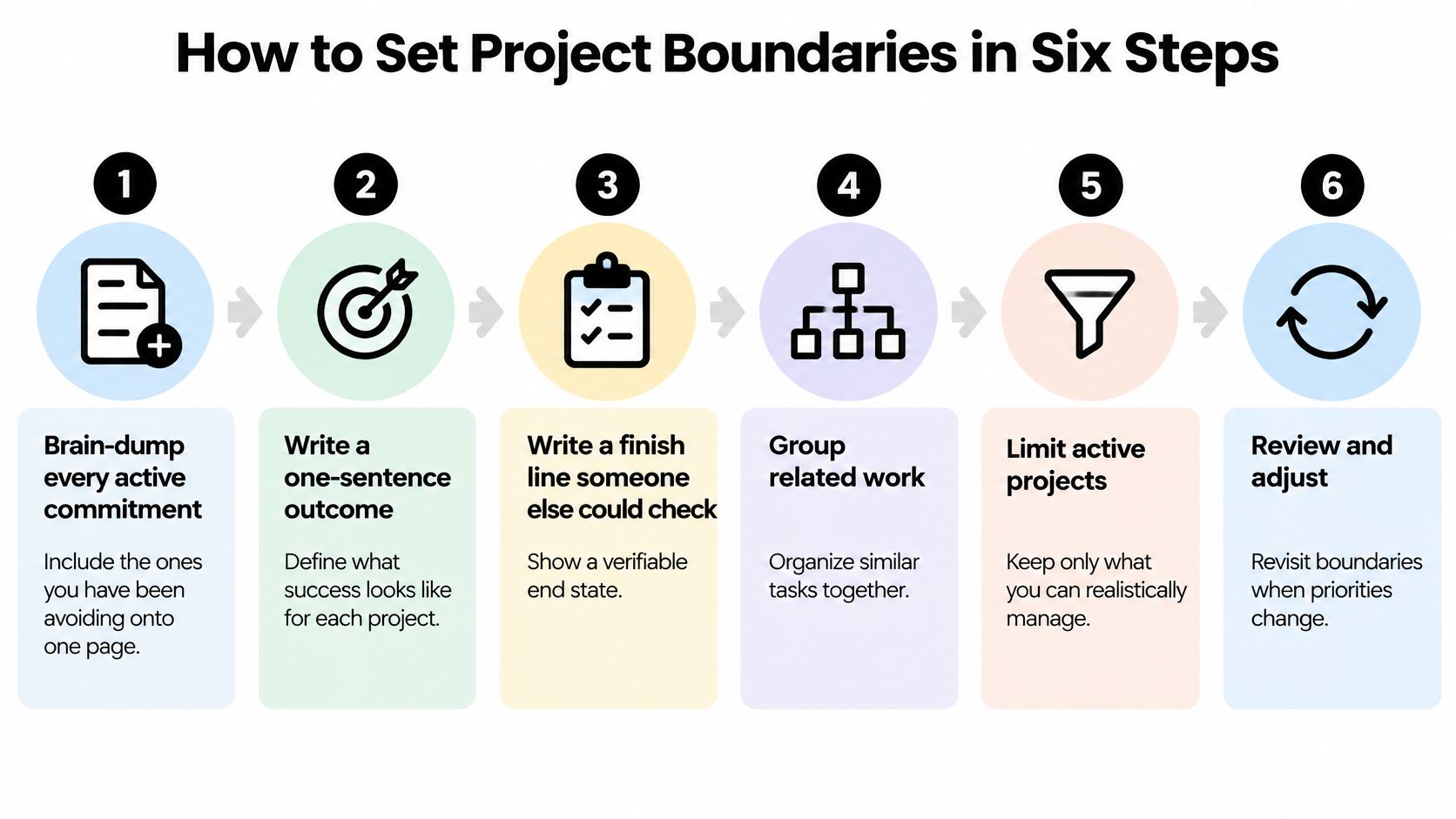
Brain-dump every active commitment. Include client delivery, internal improvements, hiring, and the thing you’re avoiding because opening the folder feels unpleasant. Capture promises, not just tasks already living in your task manager.
-
Write a one-sentence outcome for each project. “Improve marketing” is a department’s permanent occupation, not a project; “publish the new pricing page” gives you something you can finish.
-
Choose a finish line someone else can check. Name the file, approved deliverable, or observable result. Separate delivery from business results when necessary: publishing a page and generating paid signups aren’t the same milestone.
-
Give the project a deadline and a weekly time cap. The deadline creates a delivery commitment; the cap stops an attractive project from consuming time already promised elsewhere. If the scope won’t fit, reduce it or renegotiate before starting.
-
Name the owner and scope decision-maker. The owner coordinates delivery, while the decision-maker approves changes beyond the agreed boundary. They can be the same person, but don’t leave that assumption unspoken.
-
Map dependencies and shared specialists. Identify what must happen first and who appears across competing schedules. A designer assigned to several simultaneous launches isn’t extra capacity, however enthusiastically the calendar is colored.
Use this visual as a compact reminder of the boundary-setting process.
Copy a boundary card for each project
For a small-team founder, try a limit of three active projects as a starting experiment, not a universal capacity claim. Lower it if you personally perform the critical work on every project. The ADHD overcommitting guide is useful when choosing the limit feels harder than doing the work.
The following is a hypothetical project boundary card. Its dates, hours, targets, and escalation amounts are example settings, not recommended benchmarks.
| Field | What to write | Example |
|---|---|---|
| Outcome | One sentence describing the result | Pricing page with three tiers live on the site |
| Finish line | A check someone else can verify | Five paid signups recorded from the page |
| Deadline and cap | Date plus weekly hour limit | Ship by 14 March, maximum 6 hours a week |
| Owner and decision rights | One name and what they decide alone | Ops lead decides copy, founder approves prices |
| Dependencies | Who or what this project waits on | Waiting on designer logo review, shared with the newsletter launch |
| Escalation threshold | When to stop and tell someone | Any slip beyond three days or spend above 500 EUR |
Build an External Command Center for Every Project
Set up a board for each project in Trello, Asana, or Notion, then create a portfolio view showing the current commitment from each. Don’t copy every subtask into the portfolio. You need to see delivery decisions, not inspect the entire engine through the dashboard.
Use the same workflow across projects so nobody has to learn a new organizational dialect for each client.
This is the level of visibility to aim for: shared commitments and recognizable stages.
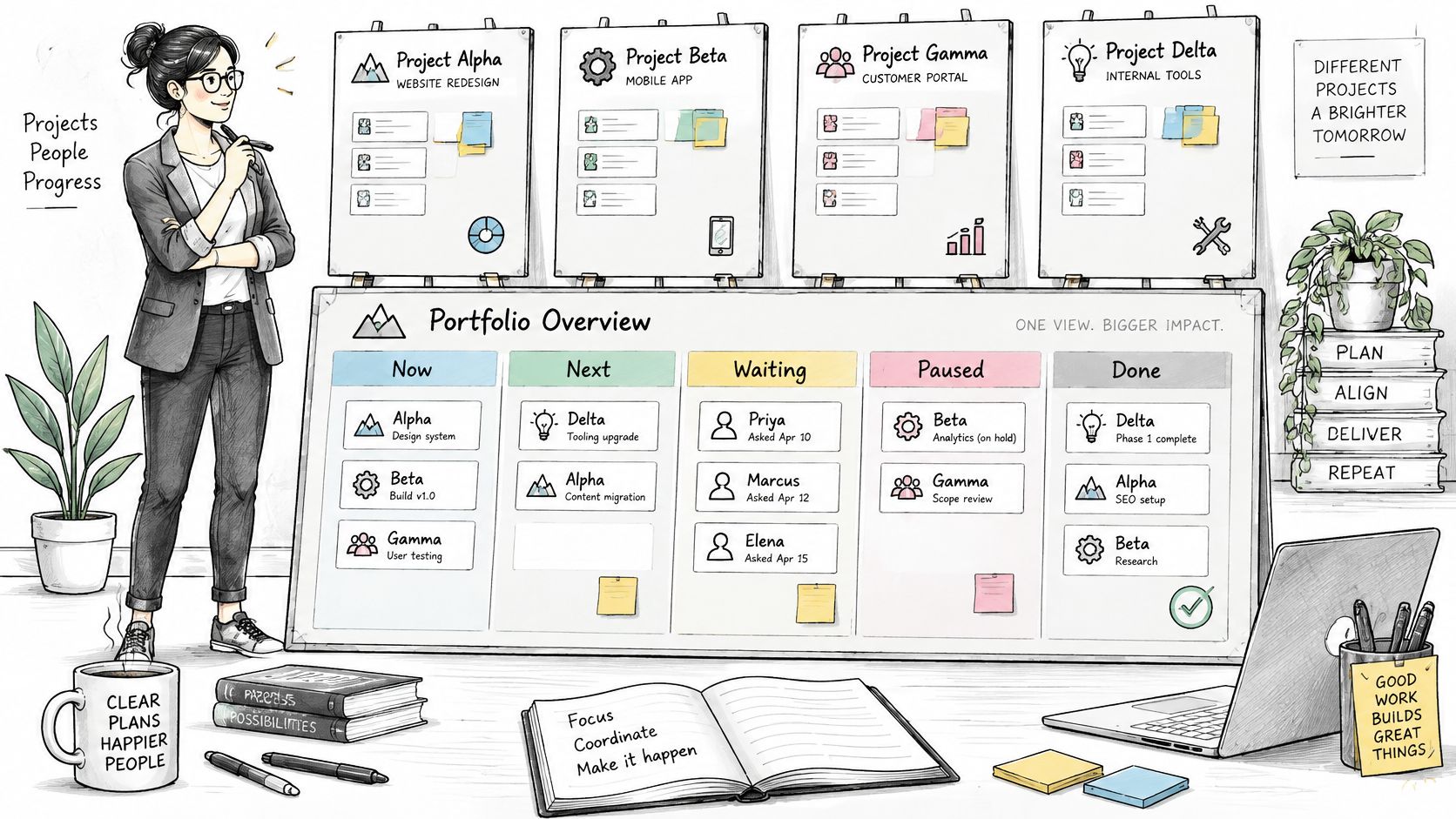
- Now: Work you’ve committed capacity to doing.
- Next: Ready work that hasn’t earned an active slot.
- Waiting: External dependencies, including the person’s name and the date you asked.
- Paused: Deliberately stopped work, with a reason and a restart review date.
- Done: Accepted work, with evidence attached.
A paper system can work too. The project-planning notebook method gives you an alternative when maintaining software becomes its own recreational activity.
Make intake harder than capture
Add an Inbox or parking queue outside the delivery workflow. Capture requests freely, but don’t confuse capturing them with accepting them.
For an initial setup, try parking routine new requests for 48 hours before committing. That’s a proposed operating rule, not a research-backed ideal; genuine emergencies can bypass it when someone records the consequence of waiting and the work being displaced.
The organizational problem is substantial: a 2025 survey of 1,488 project and portfolio-management professionals published by Smartsheet found that 92% struggled to adapt to change. A prettier board won’t settle conflicting stakeholder demands.
No card enters Now without another card leaving it.
Configure simple triggers where your tools support them. For example, route labeled client emails into Inbox within an hour and send a reminder when a Waiting card reaches three days. These are starter settings to test, not promises that an integration will behave perfectly without checking permissions and automation limits.
Use the video as an additional workflow reference, then apply the rules to your actual commitments.
When someone insists their request is urgent, ask what happens if it waits and which existing commitment they want displaced. An outage deserves different treatment from an executive discovering a competitor’s new homepage.
A dashboard without intake authority just helps an overloaded founder produce better status updates. Decide who can change priorities, and keep the agreed order stable between reviews unless the emergency rule applies.
Pause and Restart Without Losing the Thread
Before leaving a project, write a pause note in the task card or working document. Put it where you’ll resume, not in a separate productivity journal you’ll need another system to find.
Use these fields:
- Current objective: What are you trying to achieve at this stage?
- Next physical action: Start with a verb and an object, such as “Email Lena the revised invoice PDF.”
- Open decisions: What remains undecided, and who decides?
- Waiting items: Name the person, request date, and expected response.
- Definition of done: What evidence will let you close this piece of work?
“Continue proposal” isn’t a restart instruction. It requires you to reread the proposal, remember the client conversation, and rediscover why you stopped. “Replace the implementation section using Lena’s comments in the attached document” lets you begin.
Make returning a small procedure
A 2025 meta-analytical assessment described by Syracuse University’s Whitman School found ADHD symptoms positively associated with entrepreneurial behaviors such as opportunity-seeking, while inattention was negatively associated with post-launch outcomes. That’s an association, not a verdict on your ability to run a business.
The practical response is to support follow-through without trying to extinguish curiosity. Founders still need to move between delivery, money, people, and opportunities.
Try this three-minute restart ritual as a working experiment: read the pause note, perform the next physical action if it takes under two minutes, then set a 25-minute focus timer. If the action needs longer, start it inside the focus block rather than searching for something easier.
Restart test: Can you tell what to do next without reopening the entire conversation history?
For creative work, leave a rough marker such as “[Next paragraph: explain why the cheaper option creates more support work].” It preserves your intended direction without requiring you to finish the paragraph before stopping.
Don’t turn the pause note into a report. Link the current file, record the unresolved issue, and stop. You’re leaving yourself a usable handrail, not writing the director’s commentary.
Delegate With Role Templates and a Handoff Checklist
The most frustrating delegation failure is handing over execution while keeping every decision. Your specialist receives a task, but every uncertainty returns to you for approval. You’ve outsourced the typing and retained the queue.
Delegation transfers authority within boundaries. The recipient needs enough context to choose a method, enough clarity to recognize completion, and an explicit reason to escalate.
Use the following role templates as a starting point. The numerical triggers are illustrative team policies to agree before work starts, not industry standards.
Role templates for multi-project delegation
| Role | Decision rights | Hand over | Escalate when |
|---|---|---|---|
| Project lead | Scope inside the boundary card and daily calls | Outcome, finish line and budget cap | Deadline at risk or forecast spend exceeds the cap by more than 10 percent |
| Specialist | Method, tools and quality within the brief | Brief with an acceptance test and due date | Blocked for 24 hours or the brief no longer fits |
| Coordinator | Scheduling, files and follow-ups | Approved templates, contact list and checklist | Client asks for a change in scope |
| Founder | Priority order, final approval and spend above threshold | Weekly review pack only | Anything that moves a deadline or a client promise |
A role title isn’t enough. A project lead who can’t approve routine choices is a messenger wearing a more expensive hat.
For a broader approach to authority and accountability, Grow My Acorn explains how to turn delegation into a leadership strategy. For the operational brief itself, use the guide to delegating tasks effectively.
Check the handoff before sending it
- Owned decision: State what the person can decide without asking you.
- Acceptance test: Write the pass condition in a line.
- Context package: Include the pause note and link the current working files.
- Escalation trigger: Define the event that requires a decision, not merely an update.
- Review date: Put the checkpoint on both calendars.
A specialist brief can be short:
Build the approved landing page in Webflow using the linked copy and components. You own layout implementation. Done means the page loads without horizontal scrolling on the agreed mobile test devices, the signup form creates a test CRM record, and the project lead accepts the staging link. Escalate before changing the offer or adding paid software.
Notice what isn’t there: a prescribed click-by-click method. If the specialist owns implementation, let them implement.
Ask the recipient to summarize the outcome and their decision rights before starting. That exposes ambiguity while it’s still cheap to fix. Then keep founder approval for priority order, spending above the agreed threshold, and changes to deadlines or client promises, rather than inserting yourself into routine production choices.
Batch Your Week and Reward Each Finished Block
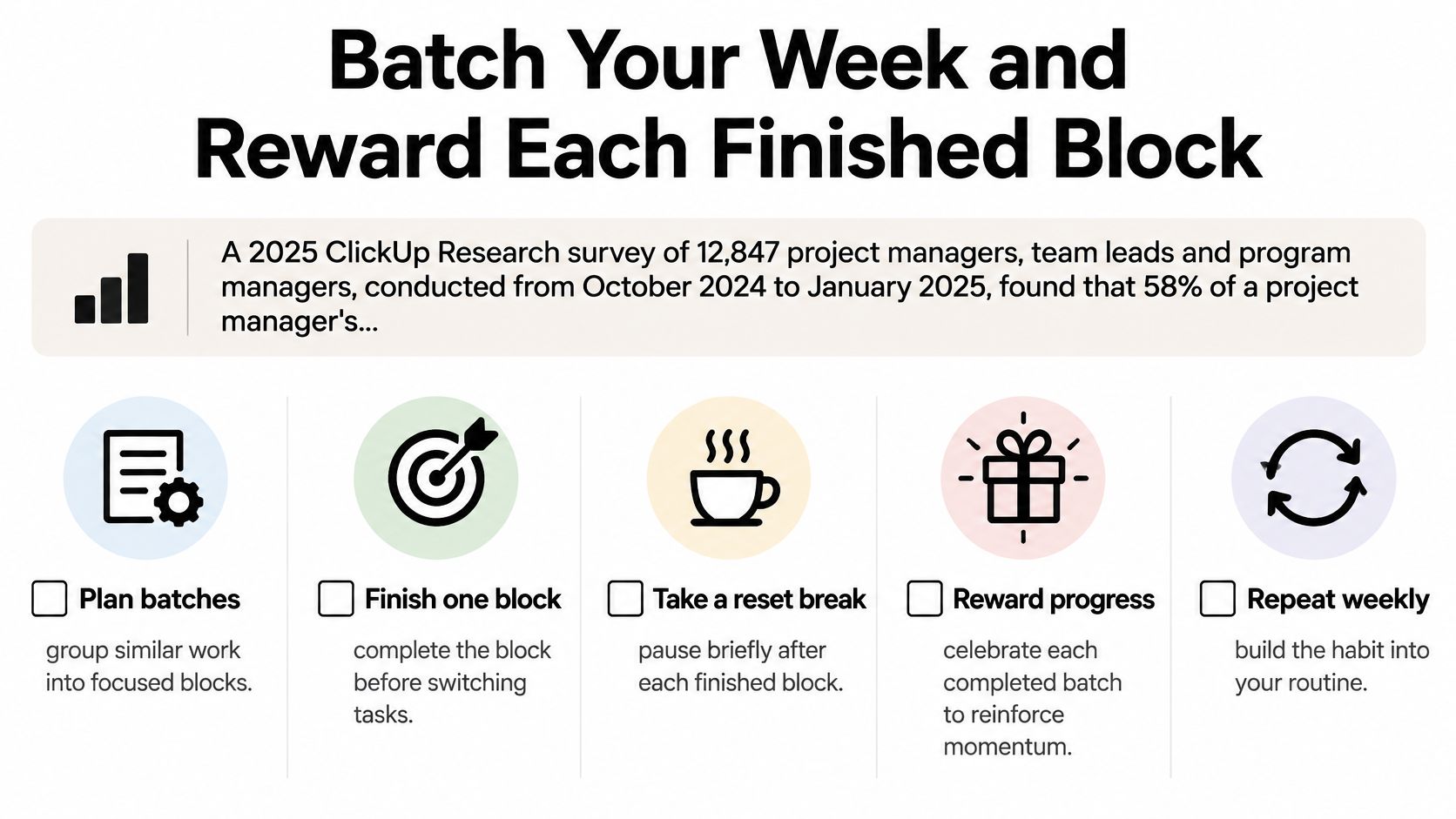
In 2025, 58% of a project manager’s workweek was spent on administrative tasks, according to ClickUp Research’s survey of 12,847 project managers, team leads, and program managers, conducted from October 2024 to January 2025. Administration isn’t imaginary work, but it needs a container so it doesn’t occupy every gap in your day.
Batch by work mode, not just project. Preparing invoices across clients uses a different kind of attention from building a sales page. Mixing both into an uninterrupted stream of notifications makes it difficult to protect either.
Give each work mode a home
The following daily block schedule is a sample calendar, not a prescription. Adjust the windows around care responsibilities, client time zones, and when you can reliably concentrate.
| Block | Work type | Rule |
|---|---|---|
| Deep build, 9:00–10:30 | One project only | Phone in another room, Now column only |
| Admin sweep, 10:45–11:15 | Invoices, approvals, status updates | Same time every day, routine admin stays inside it |
| Client calls, 13:00–15:00 | All calls stacked together | No routine calls outside this window |
| Reply window, 16:00–16:30 | Email, chat and notes | Notifications off for the rest of the day |
Keep unscheduled space between these blocks. A calendar packed edge to edge assumes you won’t need lunch, recovery, or an awkward conversation with your accountant.
Use this checklist to keep the batching routine visible.
Reward completion without creating another distraction
Build modest rewards around the work rather than waiting for the entire project to finish.
- Mark the card: Move it when the agreed unit is accepted, with a satisfying completion sound if you enjoy one.
- Take a reset: Try a ten-minute walk after a deep block instead of opening a feed.
- Show progress: Record finished blocks in a visible tracker, including blocks that resolved a difficult decision rather than produced a shiny artifact.
Treat physical maintenance as calendar work too:
- Protect sleep: Reserve a consistent sleep window instead of using bedtime as overflow capacity.
- Schedule movement: Try twenty minutes of movement before the deep block if that fits your circumstances.
- Eat deliberately: Put food before the first call, rather than discovering hunger halfway through negotiations.
These are practical scheduling experiments, not ADHD treatment claims. ADHD is not a superpower and not a curse; it’s a different operating system that crashes if it isn’t maintained.
Protect the deep block from calls, keep routine admin inside its sweep, and silence notifications outside the reply window. Agree an emergency contact route with your team so being focused doesn’t mean being unreachable when it matters.
Review Your Portfolio Weekly and Book Your Next Step
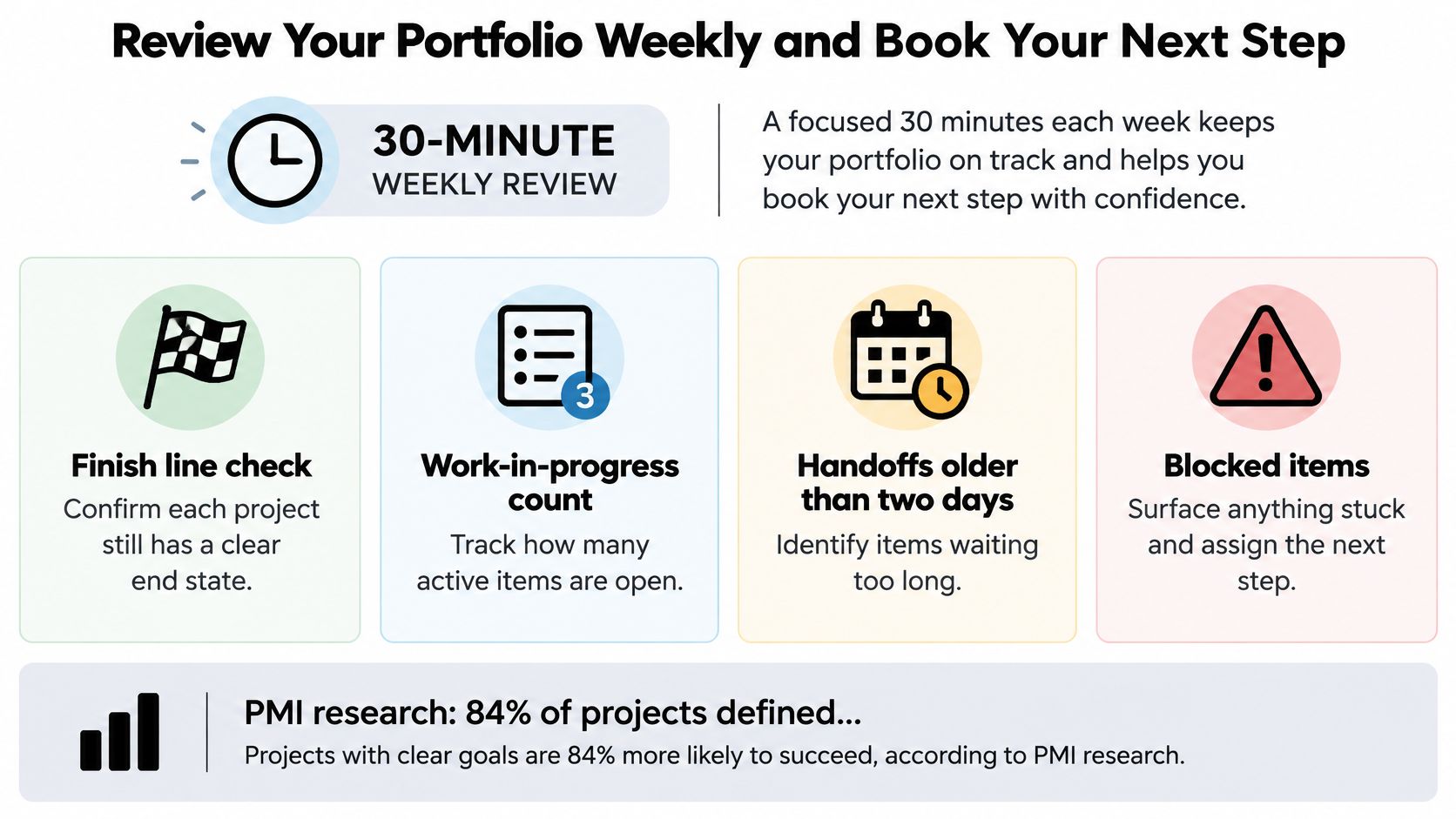
Book a 30-minute weekly portfolio review as a starting operating rhythm. Open the portfolio board and boundary cards, not a slide deck explaining why everything is almost fine.
Check whether each finish line still describes the intended result, count active commitments, inspect handoffs older than two days, and assign a next action to every blocked item. Those timings are proposed review rules; adjust them to the consequences of delay in your business.
Clear acceptance criteria deserve attention: PMI’s project success report reports that 84% of projects defined success criteria upfront, and projects doing so achieved a Net Promoter Score for project success of 41 versus 20 when criteria weren’t defined upfront.
Use this visual to keep the review focused on decisions rather than reciting task lists.
Tie status to an observable condition
Use the following example status policy, then adapt its thresholds to your boundary cards. If several conditions apply, use the most serious status.
| Status | Condition | Action |
|---|---|---|
| Green | Finish line date holds and work in progress is within limit | Continue with no escalation |
| Amber | One missed handoff or a two-day slip | Fix within the week and name the owner |
| Red | Slip exceeds three days, a spend threshold is breached, or no recovery fits available capacity | Escalate to the sponsor the same day |
The main trap is scope drift disguised as responsiveness. A client asks for a small addition, you agree to be helpful, and the team inherits work nobody priced or scheduled.
Require material changes to show their effect on scope, schedule, and capacity. Then choose a trade-off: defer, delegate, or remove something before accepting more.
Make the stop decision explicit
Hold a monthly sponsor decision session to resolve conflicts the team can’t settle. The founder’s useful contribution is deciding what stops, not asking everyone to try harder.
When one person is carrying incompatible commitments, the workload distribution tips from Magic Genie can help you examine assignments before buying another tool. Moving work only helps when the receiving person has the skills, authority, and capacity to accept it.
This week, build boundary cards for your most urgent projects and book the first review. Leave that meeting with named decisions, updated commitments, and deliberately paused work, not merely a more accurate description of overload.
Jan Kutschera offers the ADHD Founder System Sprint, an individual consulting session with the preparation, follow-up materials, and support stated in the offer, to help you build a workable operating system for competing projects. It’s a live attended session delivered as a booked call with a scheduled start. Visit Jan Kutschera to review the offer and book a session focused on your project boundaries, re-entry points, and team handoffs.
Jan Kutschera
German founder, diagnosed with ADHD at 51. Built 4 agencies, now building systems for neurodivergent entrepreneurs. German engineering for the ADHD brain.
Connect on LinkedInRelated Articles
ADHD Project Management: Systems That Work with Your Brain
ADHD project management that works with your brain, not against it: external structure, visible tasks, smarter delegation and follow-through that lasts.

Case Studies for ADHD: 6 Proven Models for Founders
Case studies for ADHD: six proven models with tactics founders can apply to structure, delegation, and energy. Practical lessons for sharper focus.
ADHD Burnout Cycle: Stages Founders Can Break
See the ADHD burnout cycle in five stages, separate it from depression, and test founder fixes before the next crash.